
A screenshot should reduce questions
Short answer: show the whole relevant region, mark one primary problem, and attach reproduction details that an image cannot contain.
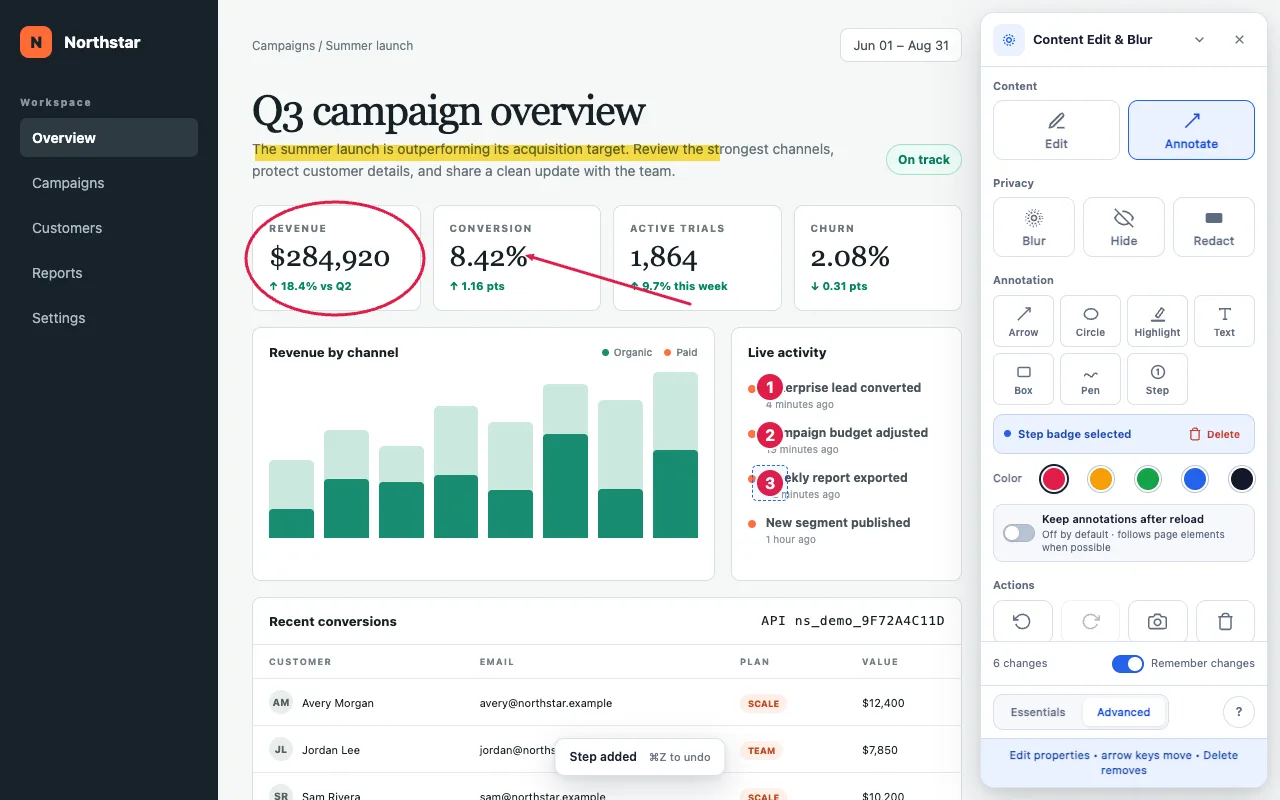
A circle or arrow can remove ambiguity about the failing control. A highlight can identify the incorrect line of text. Numbered Steps can explain a short order of operations without covering the interface with prose.
Annotations are session-only by default because most exist for one screenshot. Turn on Keep annotations after reload when the marks should return. New kept marks follow the page element beneath them when a stable target is available.
Build the visual report
Reproduce the failure first
Reach the exact state where the problem occurs. Keep the viewport, zoom, account role and relevant filters unchanged until after capture.
Choose one primary mark
Use a circle or box for a region, an arrow for a target, or the highlighter for copy. Too many marks force the reader to decode the annotation instead of the bug.
Add a short sequence only when needed
Advanced includes numbered Steps. Place them in the order a tester should follow, and explain those numbers in the written reproduction steps.
Protect private information
Blur only non-sensitive values that should recede visually. Use Redact for customer details, credentials or any other sensitive information, even in an internal report.
Capture and attach the screenshot
Use Screenshot to save the visible viewport without extension controls. Finished annotations and privacy effects remain. Give the file a descriptive name when adding it to the issue.
Add what the image cannot prove
Content Edit & Blur captures the visible tab. It does not collect console output, network requests or environment details, so add those separately when they matter.
- Expected behavior and actual behavior.
- Minimal steps to reproduce.
- Page URL or route, with secrets removed.
- Browser and extension versions.
- Viewport or device class when layout is involved.
- Console or network evidence when the failure is technical.
Do not edit away evidence. Use Edit only to construct a proposed fix or simplify a separate explanation. Preserve an untouched capture of the actual failure when fidelity matters.
Make the bug obvious at a glance.
Free, with no paid features or account. Optional sponsorship unlocks nothing.